
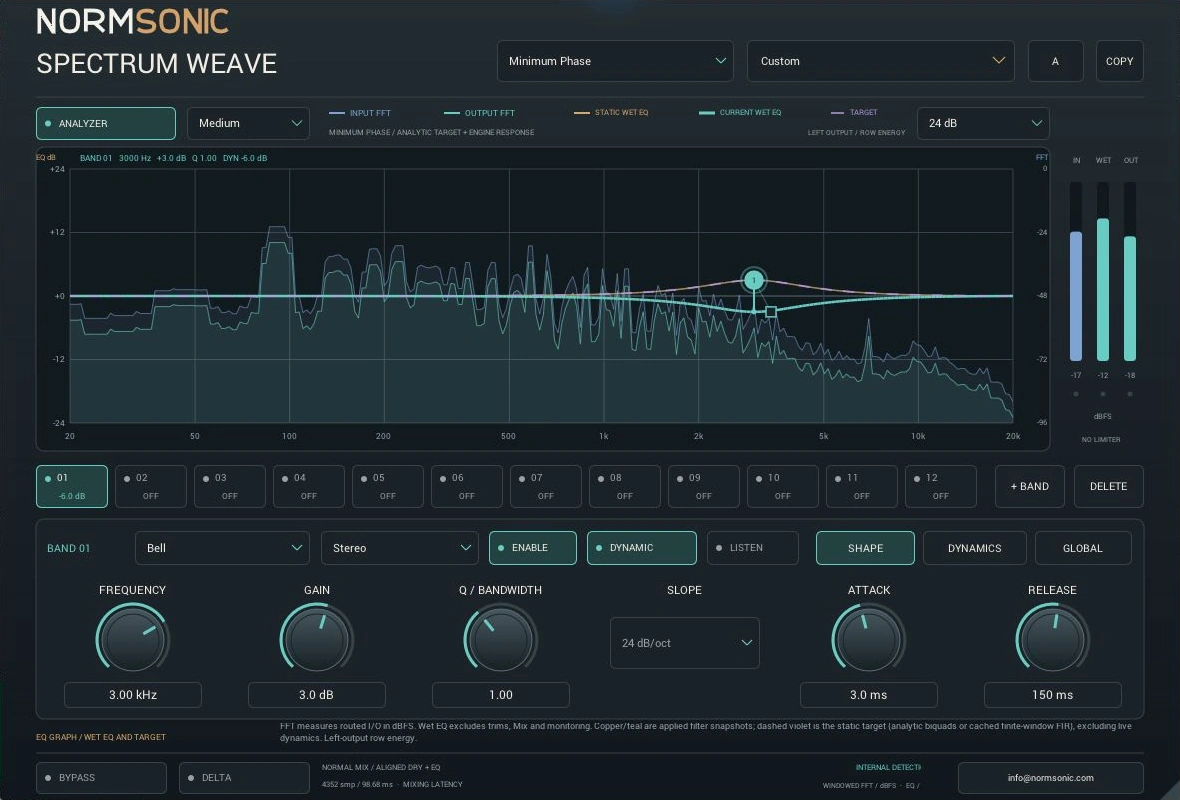
Move up to 12 nodes in log-frequency/dB space. Wheel adjusts Q; physical entry and fine adjustment refine the result.
Graphical dynamic EQ / Free early releaseSpectrum
Spectrum
Weave.
Find the frequency. Shape the feeling. Twelve editable EQ slots, focused per-band dynamics and a clear view of the signal.
v0.1.0 · Windows x64VST3 + StandaloneFree · No activation
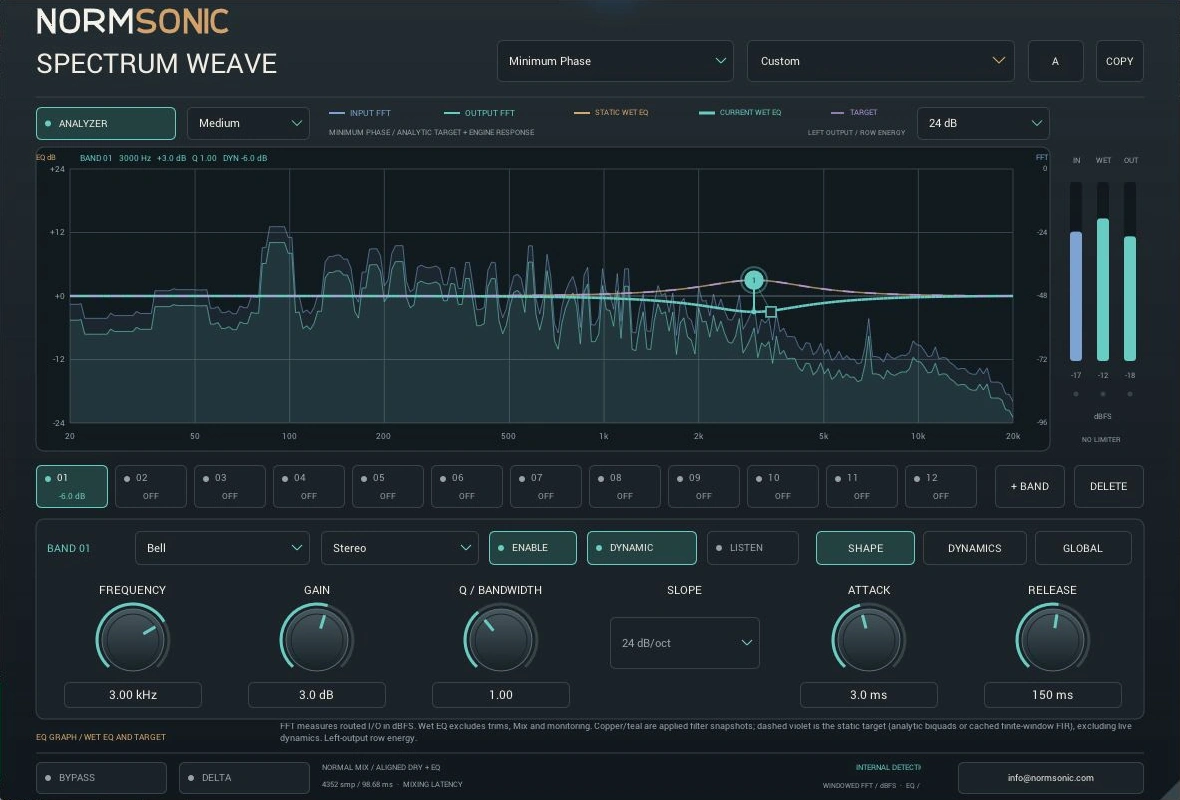
Actual native plugin interface. The spectra are measured input/output; the EQ response curves use a separate dB scale.
12 stable slots · 216 automatable parameters · 32 complete factory recipes
12 editable nodes
Frequency, gain, Q and focused dynamics
8 filter shapes
Bell, shelves, cuts, notch, band-pass and tilt
Real FFT spectra
Measured input/output, separate from EQ curves
Static FIR mode
Linear-phase static EQ; dynamic correction is mixed phase
8 filter shapesOriginal static and dynamic frequency shaping
216 controls12 globals + 17 fields for each stable band
External sidechainGenuine optional auxiliary input
4352 samples PDCSame fixed latency in both phase modes
A shape for the sourceEight filters.
Eight filters.
Twelve places to work.
Explore the actual graphical interface. Every numbered slot has a fixed identity; adding or deleting a band never moves another band's automation.
Selected filter
Bell
Focus a boost or cut around one frequency, with Q controlling the bandwidth.
Try a modest presence boost or a narrow resonance cut. Enable Dynamics to act only when that region becomes strong.
The source. The balance.Hear the detail.
Hear the detail.
Keep the performance.
Switch OFF/ON at the same position. Explore musically useful EQ recipes while playback continues; the current pair keeps playing as the next one loads.
Compare the complete 2:50 song and active individual performances, processed by the actual SPECTRUM WEAVE engine. Every example includes its settings. OFF/ON keeps the same playback position.
Loading the listening room…
Shape. Dynamics. Global.Make space.
Drag the frequency balance Dynamics with a purpose A view of the signal Two phase behaviours Stable automation Stereo and detector routing Useful monitoring Honest latency
Make space.
Keep the character.
Selected-band controls expose meaningful physical settings without placing 216 knobs onto one screen.
Bell, shelves and Tilt can respond to their frequency region with Threshold, Ratio, Knee, Attack, Release, Range and Direction.
Input/output FFT spectra are measured dBFS, while static/current EQ transfer is dB. A silent input does not generate a decorative spectrum.
Minimum Phase uses original biquad filters. Linear Phase FIR uses an 8193-tap symmetric static kernel; active dynamic correction adds minimum-phase processing.
Twelve globals and 17 fields for each of 12 fixed slots make 216 parameters. Deletion disables a slot; it does not shift IDs.
Each band can process Stereo, Left, Right, Mid or Side. Choose internal detection or a genuine optional auxiliary input.
Per-band Listen reveals the actual detector region. Delta compares aligned dry minus wet; Bypass returns delayed untrimmed dry.
Both modes have fixed 4352-sample compensation: about 98.68 ms at 44.1 kHz. Plan for buffered mixing and mastering, not zero-latency live monitoring.
The EQ response scope is left-output row energy for uncorrelated equal-power stereo. It is not a coherent L+R cancellation plot. Read the complete signal and control guide.
SPECTRUM WEAVE / Your next sessionFind a region.
Find a region.
Make a useful change.
Install the Windows build.
Extract the ZIP, keep the complete SPECTRUM WEAVE.vst3 bundle together and place it in %LOCALAPPDATA%\Programs\Common\VST3. Add that folder in REAPER's VST preferences and rescan.
Contact NORMSONIC with your host, Windows version and a description of the issue.
Where should I start?
Choose a vocal, instrument or mix recipe, select its numbered band and compare OFF/ON at similar levels. Make one focused change before adding more bands.
Why are some controls dimmed?
Disabled slots are inactive. Slope applies only to high-pass/low-pass; gain-based Dynamics apply to Bell, shelves and Tilt. Threshold, Ratio, Knee, timing, Range, Direction and Detector require active Dynamics.
Is FIR dynamic EQ entirely linear phase?
No. The static EQ kernel is linear phase. Active per-band dynamics use minimum-phase correction, making the dynamic combination mixed phase. The interface labels this explicitly.
What happens when I delete a band?
The selected stable slot and its Listen switch are disabled. No host ID is renumbered; other bands stay in place.
Free early release / 0.1.0Shape the balance.
Shape the balance.
Keep the music.
Verified with native DSP checks, the VST3 SDK and pluginval at level 5. Windows REAPER renders, automation and saved state were tested on the reviewed build. These checks describe the tested setup; other hosts and systems can behave differently.
Windows x64
Compiled VST3 plugin and Standalone application. Free Binary Use License; the publisher's own source stays private.
1.24 MiB ZIP · Windows x64
macOS
No Mac binary is built, tested or available. The current project is Windows only.