Phrase and detail
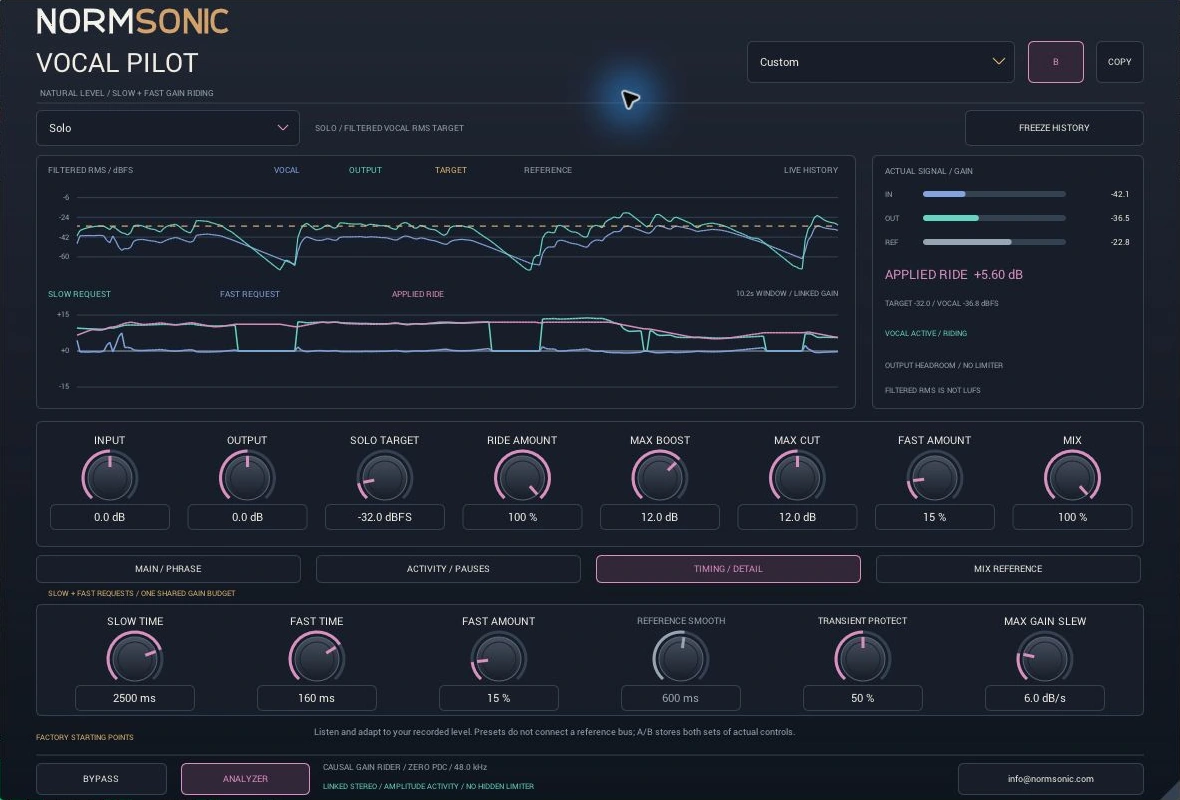
A slower phrase request and a faster residual request share one boost/cut budget. Fast Amount and Transient Protect let you retain more articulation.

Ride changing vocal phrases with a clear target and a sensible gain budget. Slow and fast correction work together, while the interface shows exactly what the rider requests and what reaches the audio.
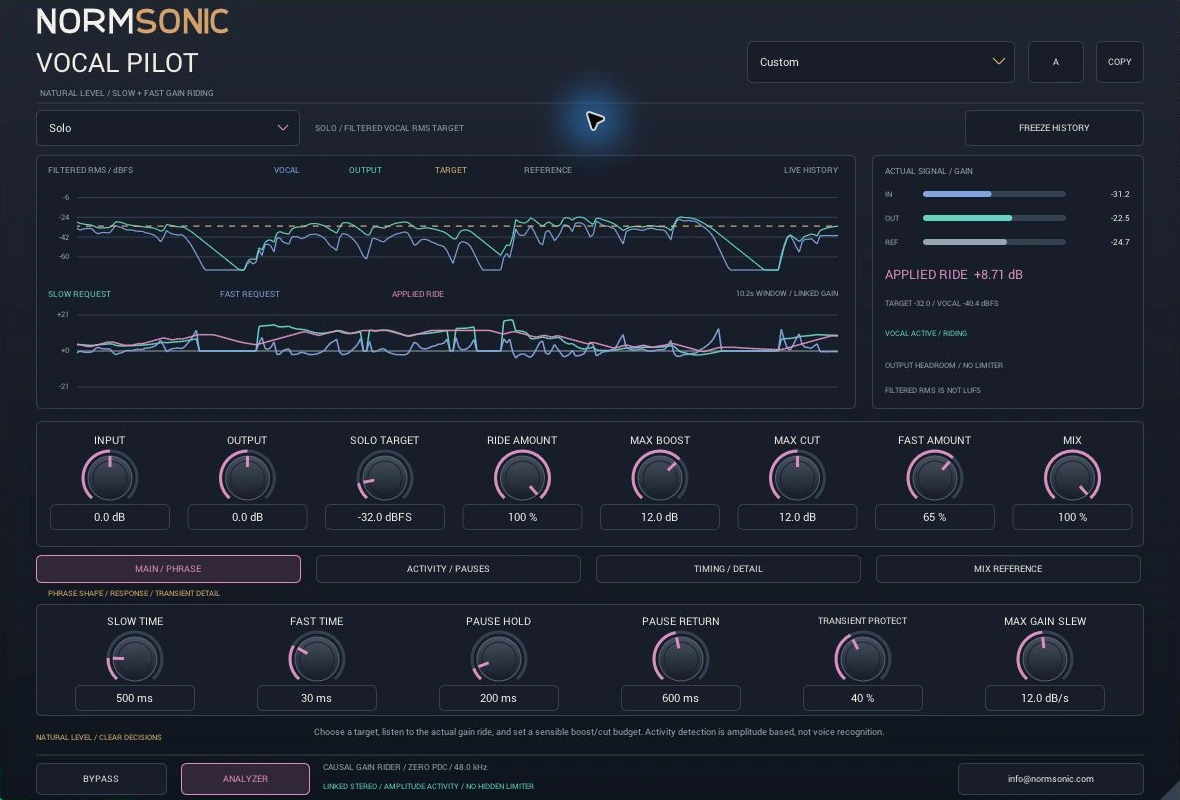
For sung leads, backing vocals, narration and spoken recordings. Set a target, define the amount of correction, and watch the actual gain instead of guessing what the processor is doing.
A slower phrase request and a faster residual request share one boost/cut budget. Fast Amount and Transient Protect let you retain more articulation.
Solo uses filtered vocal RMS in dBFS. Mix Reference follows a real external instrumental bus plus your offset. Missing or quiet sidechain is clearly shown and smoothly returns the ride to unity.
Actual input/output/reference meters, level history and slow/fast requests alongside the applied ride. Freeze only the display to inspect a moment; audio and automation keep running.
Activity detection measures amplitude. It does not recognise a singer or guarantee rejection of breaths and background noise. Below the threshold, new riding stops; Hold briefly retains the last gain and Return restores unity smoothly. Existing boost can remain briefly during a pause.
Two target workflows, with Activity and Timing controls for the recorded performance in front of you.
Choose Solo and set Solo Target in filtered RMS dBFS. Start with a modest boost/cut allowance. Slow Time follows broader phrases; Fast Amount blends the remaining detail correction.
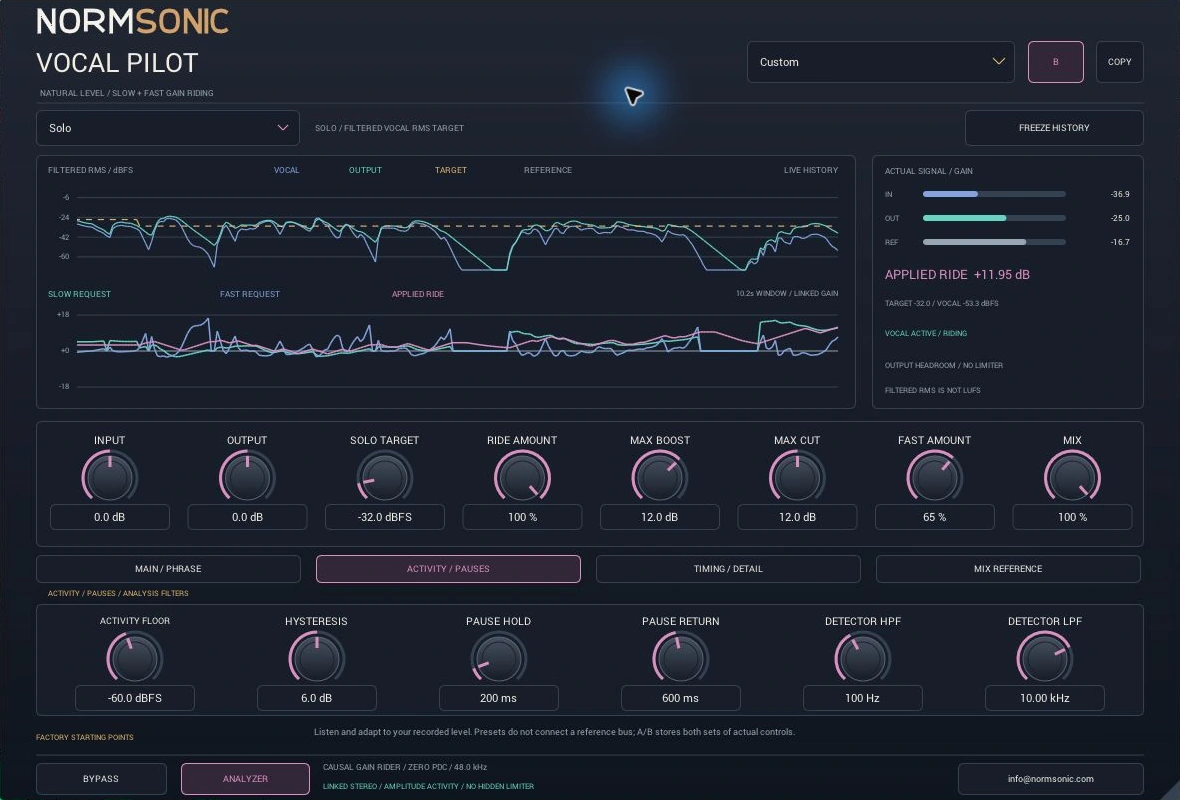
Set Activity Floor and hysteresis to the recording, then tune Pause Hold and Return. Max Gain Slew bounds the speed of actual gain movement. Changing a limit smoothly redirects existing gain; it can briefly lie outside a newly lowered limit.
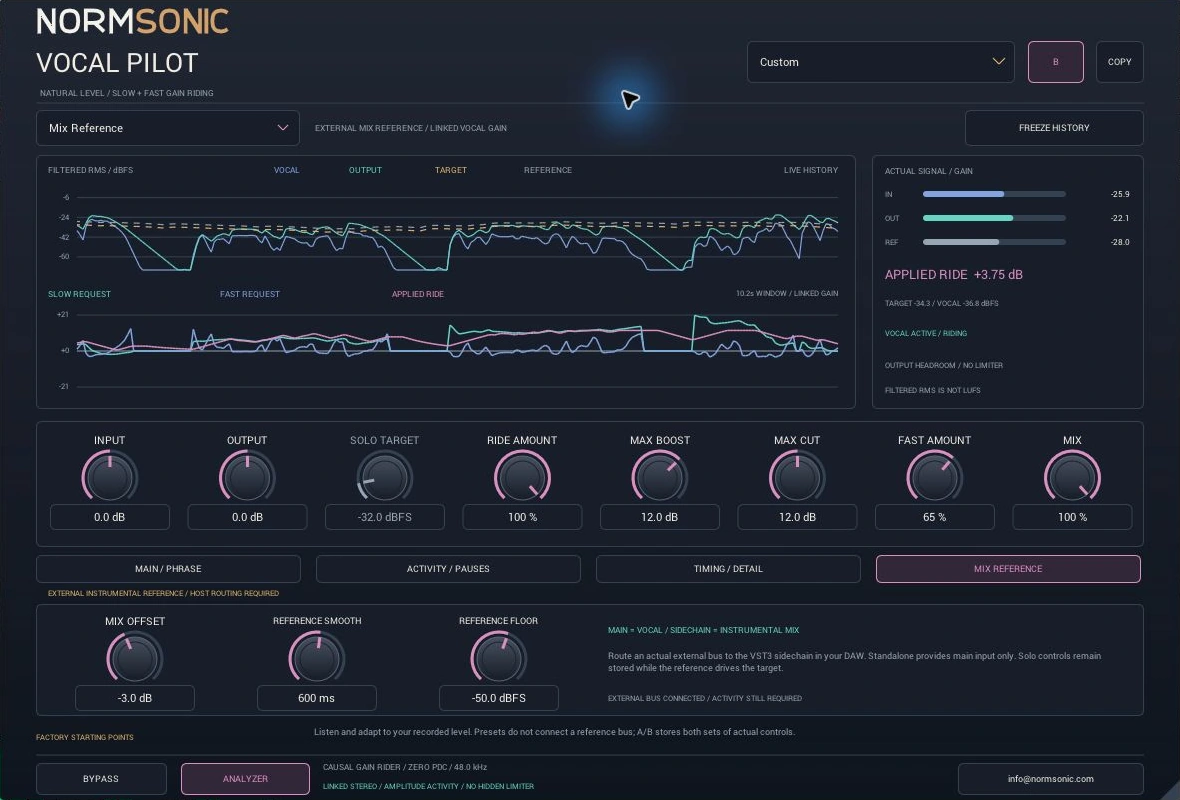
Route an instrumental bus to the VST3 external sidechain, select Mix Reference and set Mix Offset. Reference Smooth steadies its target. An unavailable or below-floor reference is explicitly reported; the rider does not invent a replacement target.
Synchronised vocal examples use the same preview gain in both versions, preserving the actual gain-riding difference. Sources, intentional level variations and settings are disclosed with each example.
Two 28-second previews use a real sung vocal and instrumental stems with deliberate smooth level changes. OFF keeps that prepared source; ON adds gain riding. Both versions share the same preview gain. This demonstrates filtered-RMS gain riding, not LUFS normalization or voice recognition.
Loading the aligned audio examples…
24 stored physical parameters, host automation, typed values, reset and explanatory tooltips. Hidden or mode-inactive controls retain their settings.
Solo Target in filtered RMS dBFS; external reference plus Mix Offset in Mix Reference. A missing reference returns actual gain smoothly toward unity.
Ride Amount, Max Boost and Max Cut constrain the requested correction. Existing gain returns smoothly at Slew speed after a limit change; steady-state limits are respected.
Slow Time, Fast Time and Fast Amount control the two correction requests. Transient Protect restrains fast cuts; Max Gain Slew governs actual gain movement.
Activity Floor, Hysteresis, Pause Hold and Pause Return stop new riding below the amplitude threshold, briefly retain the last gain and return it smoothly to unity.
Detector HPF/LPF shape only the level measurement. They do not EQ the audible vocal. Reference Smooth and Reference Floor qualify the external instrumental signal.
Input trim precedes riding; Output follows it. Mix blends identical timing paths. Exact bypass returns untouched input. Actual output peak and clipping status remain visible; there is no hidden limiter.
Filtered vocal/reference RMS, actual final output RMS, real peaks, target, slow/fast requests and applied gain. Analyzer Off disables new histories without changing audio; Freeze pauses only the displayed history.
16 original factory starting points, A/B and Copy. Both control banks are saved with the project. Sidechain connectivity is controlled by your DAW, not a preset.
Set a sensible target and modest gain allowance. Watch the actual ride and output headroom, then adapt activity and timing to the performance.
Standalone provides main input only, so use Solo there. Device and buffer settings determine system latency; zero plugin PDC does not mean zero hardware latency.
No. The target uses filtered RMS in dBFS. Analysis filters and source level affect this measurement; do not compare it directly with integrated LUFS.
Below the activity threshold, new riding stops. Hold keeps the last actual gain briefly, then Return restores unity smoothly. Existing boost can remain briefly during a pause. The threshold is not voice or breath recognition.
A real external instrumental sidechain must be connected and above Reference Floor. A whole auxiliary bus explicitly flagged silent by the host is unavailable immediately; otherwise quiet reference audio is judged after Reference Smooth. Missing or below-floor reference does not create a replacement target, and riding returns smoothly to unity. Standalone supports Solo only.
Limits constrain the requested correction. Existing gain moves toward the new budget at Max Gain Slew speed, so it can briefly exceed a newly lowered limit. This preserves continuous gain movement.
The causal gain path has no lookahead and reports zero additional audio samples to the host. Detector response and smoothing take time, but do not buffer the audible signal. Your interface and host still add latency.
Free compiled Windows x64 package with VST3, Standalone, installation help and complete license notices. Personal and commercial audio use is free.
Check the included release notes for the qualified host and known limitations. Windows only; compiled downloads with private publisher source.
All NORMSONIC downloadsPersonal and commercial audio use is free. This is a compiled-only distribution; NORMSONIC source code is not offered for download. The included license and third-party notices apply.
Questions or unexpected behaviour? Write to info@normsonic.com with your host, Windows version and steps to reproduce.