Send one source to separate parallel branches.
One mono/stereo input bus to 1–64 separate mono/stereo output buses.

Send one source to separate parallel branches.
Beta software: check your interface, host and complete signal path before using it for a performance.
01eb72a0474a25467246849ce35be5c5153a3cdab41bb118c5f22f2d5f80d63e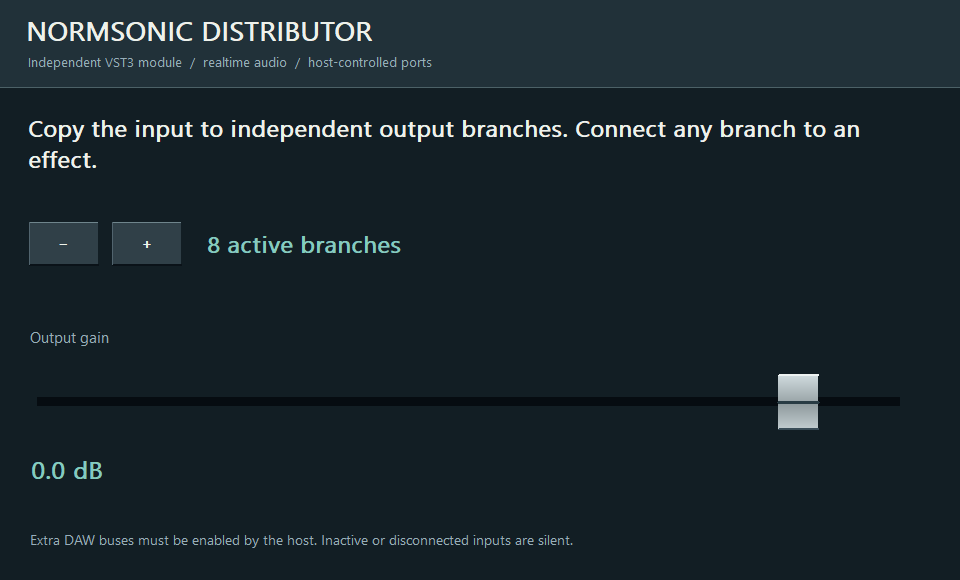
One mono/stereo input bus to 1–64 separate mono/stereo output buses.
Choose the active branch count and connect each output to an effect, recorder or fader. Use SUMMING to combine the processed results.
Active branch count and common gain. Each active output receives a copy of the input.
This VST3 is a fan-out distributor. It does not sum branches or automatically split a multichannel bus into single-channel outputs. Auxiliary outputs must be enabled in the host.
VST3 hosts expose and activate auxiliary buses differently. Enable the plugin’s extra inputs and outputs in your DAW. If your host supports only a stereo insert, use the main pair or run the full graph in RACK.
No. In a DAW they work with the audio buses supplied by that DAW. Standalone RACK opens the selected physical interface and its modules address its channels.
No. Digital summing is the neutral default. Analog-inspired saturation is an optional creative effect, not a requirement for combining signals.