Record any connected stage of your signal path.
One input bus, a pass-through output, an optional host-routed Sync event input and a new 32-bit float WAV file.

Record any connected stage of your signal path.
Beta software: check your interface, host and complete signal path before using it for a performance.
54a00aca36383cb36e702cab281cd228060d5bd3f2ed4e0abd34f93975f19cc2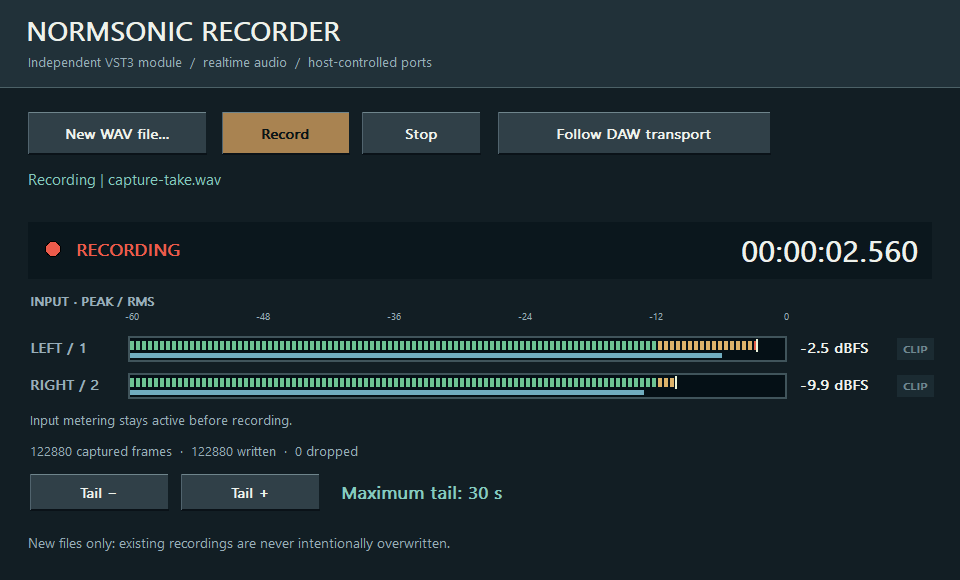
One input bus, a pass-through output, an optional host-routed Sync event input and a new 32-bit float WAV file.
Choose a new destination and connect the audio input. While audio is running, check the input meters, then arm and start recording or follow DAW transport. Confirm the REC indicator and recorded duration; an input meter alone does not mean a file is being recorded.
Destination, record/stop, Follow DAW transport, silence time and maximum tail. Input peak/RMS meters, a separate REC indicator and recorded duration show what is happening. Disk writing runs outside the audio callback.
The host must keep processing for the effect tail. For automatic source-end sync between the separate NORMSONIC PLAYER and RECORDER VST3s, route their Sync/event buses through a host that preserves NORMSONIC SysEx messages and sample offsets. Otherwise use DAW transport or manual controls. Check disk space before long recordings.
The L/R input display shows peak and RMS levels whenever the host processes audio, including when the recorder is disarmed. The clipping indicator also checks additional input channels and holds for two seconds after a sample reaches 0 dBFS. Stopping the audio engine clears the meters. Input activity shows signal, not recording.
A separate REC light confirms active recording; the time counter follows accepted audio frames. Armed/ready is waiting, TAIL continues recording the effect tail, FINALIZING finishes queued disk writes and WAV SAVED / finalized means the file has closed. Check error and dropped-frame notices before trusting a take.
VST3 hosts expose and activate auxiliary buses differently. Enable the plugin’s extra inputs and outputs in your DAW. If your host supports only a stereo insert, use the main pair or run the full graph in RACK.
No. In a DAW they work with the audio buses supplied by that DAW. Standalone RACK opens the selected physical interface and its modules address its channels.
No. Digital summing is the neutral default. Analog-inspired saturation is an optional creative effect, not a requirement for combining signals.